The Other Hours Types menu option is used to create, and maintain, codes for Other Hours. This file also contains a Rate Multiplier, Subsistence Adjustment Number and an Attendance Code. The Other Hours that are to be included in the calculation of safe hours and vacation/sick accruals may also be specified.
Note: This is a System-wide file and is not specific to any Company/Division.
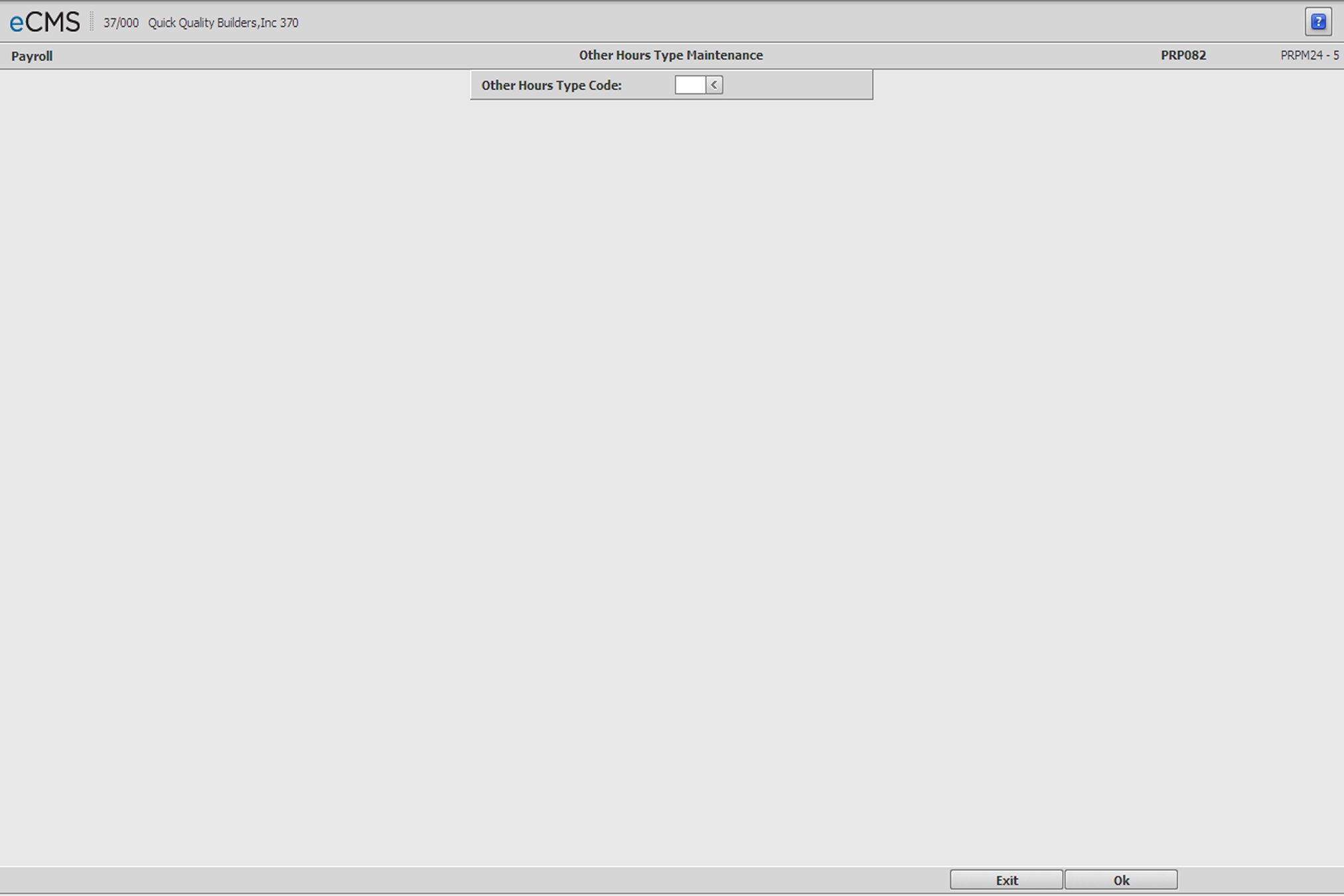
Other Hours Type Selection screen
Other Hours Type Code
Enter the Other Hours Type code to create or modify, or click the prompt to select from a list.
 |
Click to save changes and to display the Other Hours Type Detail screen. |
 |
Click to return to the Main Menu without saving changes. |
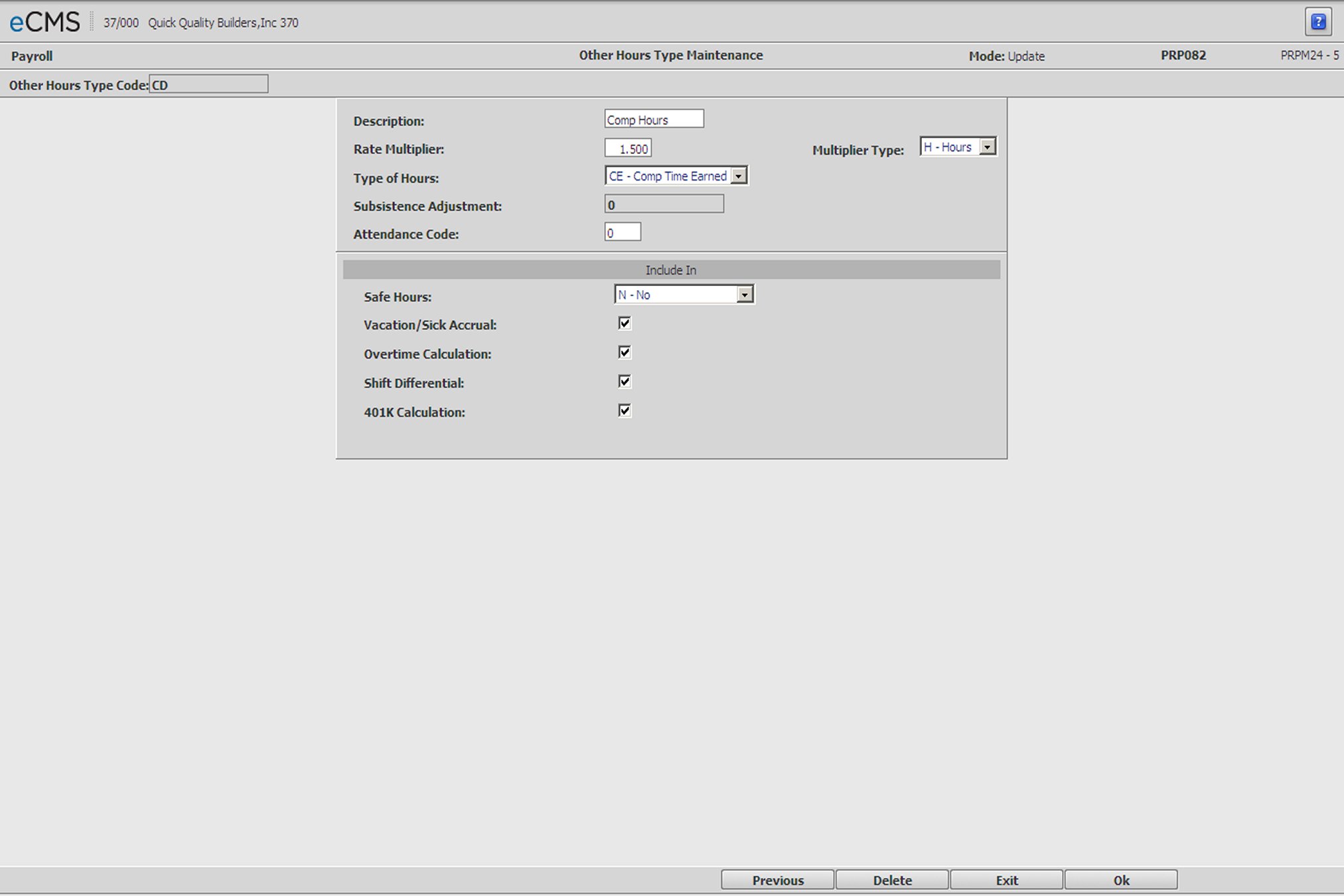
Other Hours Type Detail screen
Description
Enter the Description for this Other Hours Type.
Rate Multiplier
Enter the Rate Multiplier. If an Other Hours rate hasn’t been entered, the system will compute Other Hours based on:
The Employees Regular Hourly Rate x This Rate Multiplier
Rates for Other Hours Types are assigned in the Union
Master. Click  on the Union Class Master - Detail screen.
Multiplier Type
This field displays only if the Type of Hours field is set to “Comp Time Earned”. It is used to determine the type of compensation, Hours or Dollars, in which this Comp Time accrual will be remitted.
Dollars |
Time assigned to this Other Hours Type will be compensated in dollars according to the Rate Multiplier. |
Hours |
Time assigned to this Other Hours Type will be compensated in hours according to the Rate Multiplier. |
Type of Hours
Click the drop-down prompt and select one of the following Hours Types from the list.
Other |
Use “Other” when none of the options on this list apply. |
Overtime |
Overtime denotes time taken by someone that is not exempt from acquiring overtime. |
Double time |
“Double Time” is only used at update Double Time Hours in the Monthly Union file |
Vacation |
Hours taken off due to vacation. |
Sick |
Hours taken off due to illness. |
Holiday |
Time taken off for a company recognized holiday. |
Subsistence |
Non-taxable travel pay. |
Comp Time Earned |
Comp Time Earned (valid only if the Human Resources application is installed) is used to accrue the liability for Compensatory Time Off given to an employee who does not receive overtime pay for extra time worked. |
Comp Time Used |
Comp Time Used entries use the same General Ledger accounts to reduce the liability when the Comp Time is taken. |
Subsistence Adjustment
Enter a Subsistence Adjustment Number in order to track the Subsistence in the Employee QTD/YTD Earnings file. Because the Other Hours Type file is System-wide, the Subsistence Adjustment Number cannot be verified. It is important to check the Distribution Master and make sure the Subsistence Adjustment Number entered is set up (Distribution Code D). Distribution Master - Payroll Adjustment Entry screen.
Attendance Code
Enter the Attendance Code to be used by the system when updating the Human Resource Attendance file.
If the Human Resource Default Post Attendance File From Payroll is set to Y, this prompt displays. You may specify which Attendance Code the system should use when updating the Attendance file. If this field is zero, the system will use the Vacation, Sick, Holiday and Comp Time Used codes entered in the Human Resource Default Values.
Because the Other Hours Type file is System-wide, Attendance Type Code cannot be verified. It is important check the Human Resource Description file to make the Attendance Type Code entered is set up.
Include In
Safe Hours
This field displays only when the Payroll default, Report Safe Hours Worked, is set to Y. It is used to specify which Other Hours are to be included as Safe Hours.
Click the drop-down prompt and select one of the following from the list.
Yes, Prnt on Check |
Include the hours entered in Payroll entry using this Type Code as Safe Hours, and print them on the check |
No |
Do not include the hours entered in Payroll entry using this Type Code as Safe Hours. |
Yes, Not on Check |
Include the hours entered in Payroll entry using this Type Code as Safe Hours, but do not print them on the check |
Vacation/Sick Accrual
This field displays only when the Human Resources default, Accrue Vacation/Sick on Overtime Hrs, is set to Y for Company 000/Division 000.
Select this option to include Vacation/Sick Accrual in this Other Hours Type code.
Overtime Calculations
Select this option to include hours using this Other Hours Type code when calculating overtime.
Shift Differential
Select this option to apply the Shift Differentials to hours using this Other Hours Type code.
401K Calculations
Select this option if the new Other Hours Type Code is included in 401K plans.
Check with your Human Resources Department on whether this code is 401K-applicable. The system has the Overtime Other Hours Type code preset to 401K-applicable and cannot be changed.
Be aware that negative hours used on 401K applicable hours code may yield a negative balance. Double-check payroll reports before updating with regard to 401K applicability and negative balances.
|
Click to save changes and return to the Other Hours Type Selection screen. |
|
Click to return to the Main Menu without saving changes. |
 |
Click to delete the current Other Hours Types code. |
 |
Click to return to the Other Hours Type Selection screen without saving changes. |