The Department Master is used in the Payroll System to distribute Labor, and Labor Burden, to General Ledger accounts based on the Employee's Department.
This menu option is used to add, update, or delete records in the Department Master. This file is used by both the General Ledger and Payroll applications.
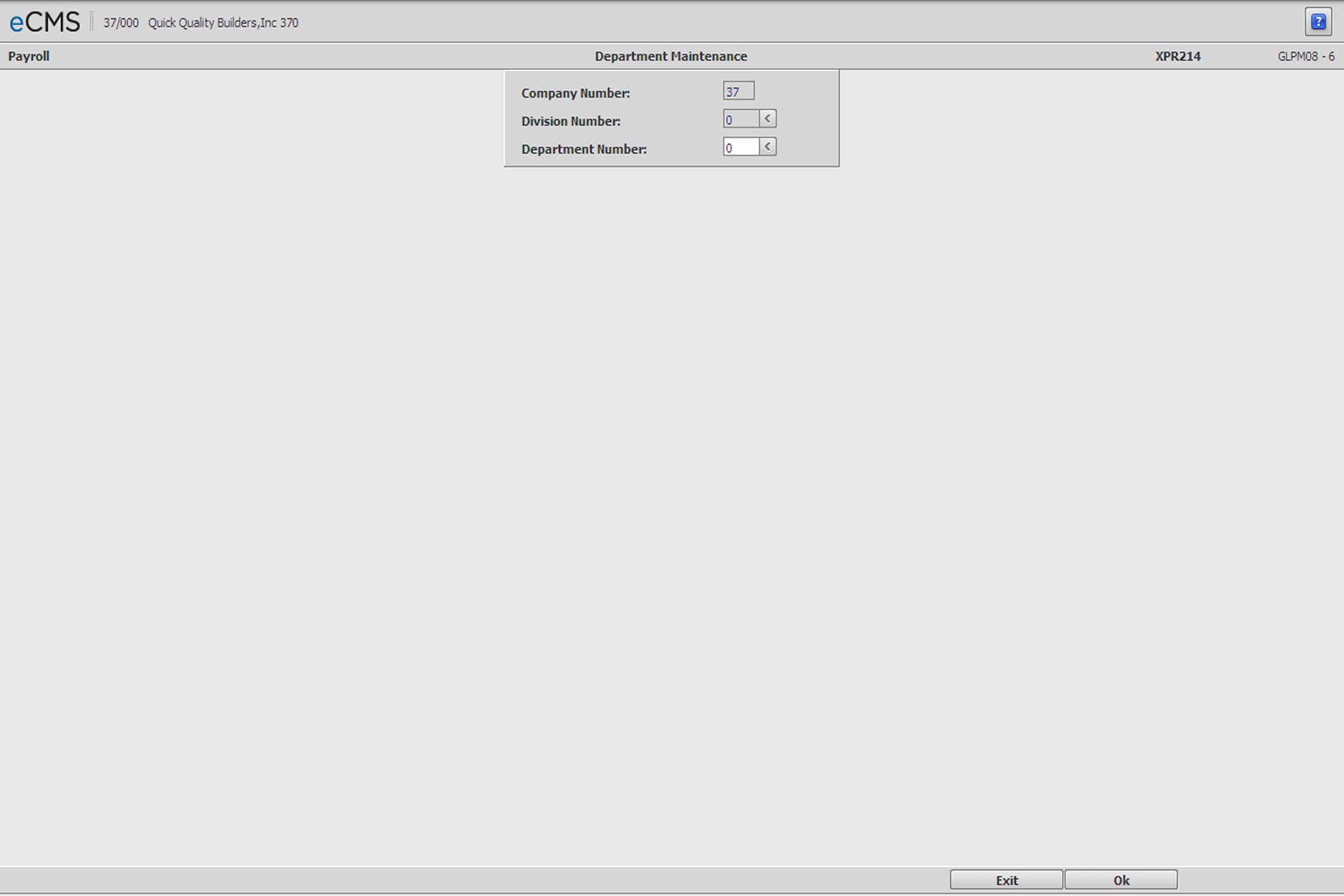
Department Master Selection screen
Company/Division Number
Accept the Company/Division used at login or click the Division Number prompt to make new selections from a list. The Company/Division Numbers are used for Inter-company transactions at the detail level.
Department Number
Enter a new Department Number, or the number assigned to the existing Department Master record being maintained. Click the prompt to select from a list. A zero department (0) is not valid.
 |
Click to process these entries and display the Department Master Detail screen. |
 |
Click to return to the Main Menu without saving changes. |
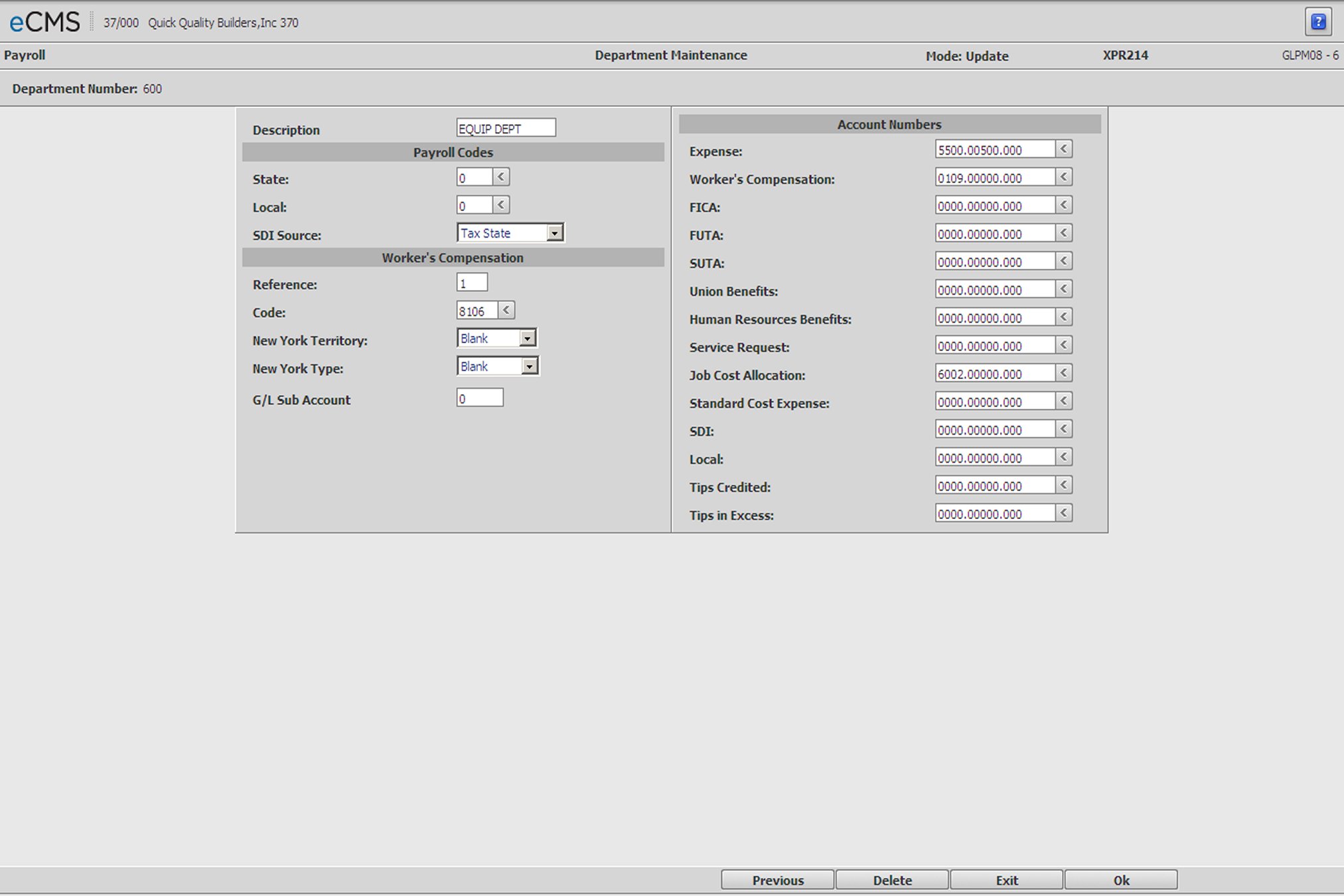
Department Master Detail screen
Description
Enter the Description for this Department that will display on applicable Payroll reports and Departmental Income Statements.
Payroll Codes
State |
If the Employee's withholding follows the Job/Sub Job, or the entry in the Employee Master, then leave this field blank and the system will use the Payroll State from the Job Description file or the Employee Master.
To base withholding on the Department location, it will be necessary to remove any entry currently in the Employee Master. An entry in the Employee Master will override this field. |
Local |
Enter a Local Code or click the prompt to select from a list. |
SDI Source |
Click the prompt to select one of the following options from the drop-down list. |
|
Calculate SDI/Local deductions based on the state being used for payroll taxes. |
|
Calculate SDI/Local deductions based on the state being used for workers compensation. |
|
Calculate SDI/Local deductions based on the state used for SUTA. |
Worker's Compensation
Reference Number
Enter a Worker's Compensation Policy Reference Number if most of the Employees in this Department are charged to the same Worker's Compensation code. Click the Code prompt to make these selections from a list.
The Policy Reference Number is set up in the Worker’s Compensation Policy Detail screen.
Code
Enter a Worker's Compensation Rate Code if most of the Employees in this Department are charged to the same Worker's Compensation code. Click the Code prompt to select from a list.
Rate Codes are set up in the Worker’s Compensation Rate Detail screen.
The hierarchy for Worker's Compensation:
1. Job Cost Master
2. Job Description file
3. Equipment Class file - For Equipment Usage
4. Employee State/Local
5. Employee Class
6. Department Master
7. Payroll Code
New York Workers Compensation Codes
These codes are used to define the geographical location of work performed and drive the monthly New York W/C Worksheets reports as well as the quarterly NY W/C Supplemental Return. These codes may be setup at the Department or Job/Sub Job level.
The following codes apply to Job/Sub Job related payroll transactions and apply only when using the New York State Code ( 330 ). The Territory Code defines the geographical location of the work performed and drives the Monthly NY W/C Worksheets reports and the quarterly NY W/C Supplemental Return.
|
Bronx, Kings, New York, Queens and Richmond counties. |
|
Dutchess, Nassau, Orange, Putnam, Rockland, Suffolk and West Chester counties |
|
All other New York State Counties. |
New York Type
The following selections apply only when using the New York State Code.
|
Bronx, Kings, New York, Queens and Richmond counties. |
|
Dutchess, Nassau, Orange, Putnam, Rockland, Suffolk and West Chester counties |
G/L Sub Account
If the field for the Human Resources Benefits Account Number is blank, the system will incorporate this sub-account number into the Expense account listed for an H Benefit. Use of this sub-account can be overridden by selecting the Do Not Use Department Sub-Account field on the Distribution Master's H/R Benefits and Deductions detail screen.
Account Numbers
Enter the General Ledger accounts used to charge (debit) the following for the Department employees.
The Direct Cost of Labor (Application Code = General Ledger).
Labor Burden (Workers Compensation, FICA, FUTA, SUTA, Union, SDI/Local, Human Resources Benefits and Local Tax).
If you do not enter account numbers for Workers Compensation, FICA, FUTA, SUTA, Union, SDI/Local, Human Resources Benefits and Local Tax, the burden for non-job labor posts to the accounts entered in the Payroll Distribution File.
Expense (Service Request)
Enter the General Ledger account to be charged (debited) when the labor expense is generated by a Service Request.
Job Cost Allocation
Enter the General Ledger account to be credited with a Standard Cost Allocation when an employee of this department charges time to a job.
Standard Cost Expense
Enter the General Ledger account to be charged with an employee's actual labor expense when an employee is charged to a job at a standard rate.
If this field is blank the actual cost is charged using the Expense General Ledger Account in this record.
Tips Credited
Enter the General Ledger account to be charged (debited) with the Tips Credited amount.
Note: This account overrides the debit account in the Payroll Distribution file.
Tips In Excess
Enter the General Ledger account to be charged (debited) with the Tips In Excess amount.
Note: This account overrides the debit account in the Payroll Distribution file.
|
Click to process these entries and return to the Department Master Selection screen. |
|
Click to return to the Main Menu without saving changes. |
 |
Click to delete the current record. |
 |
Click to return to the Department Master Selection screen without saving changes. |