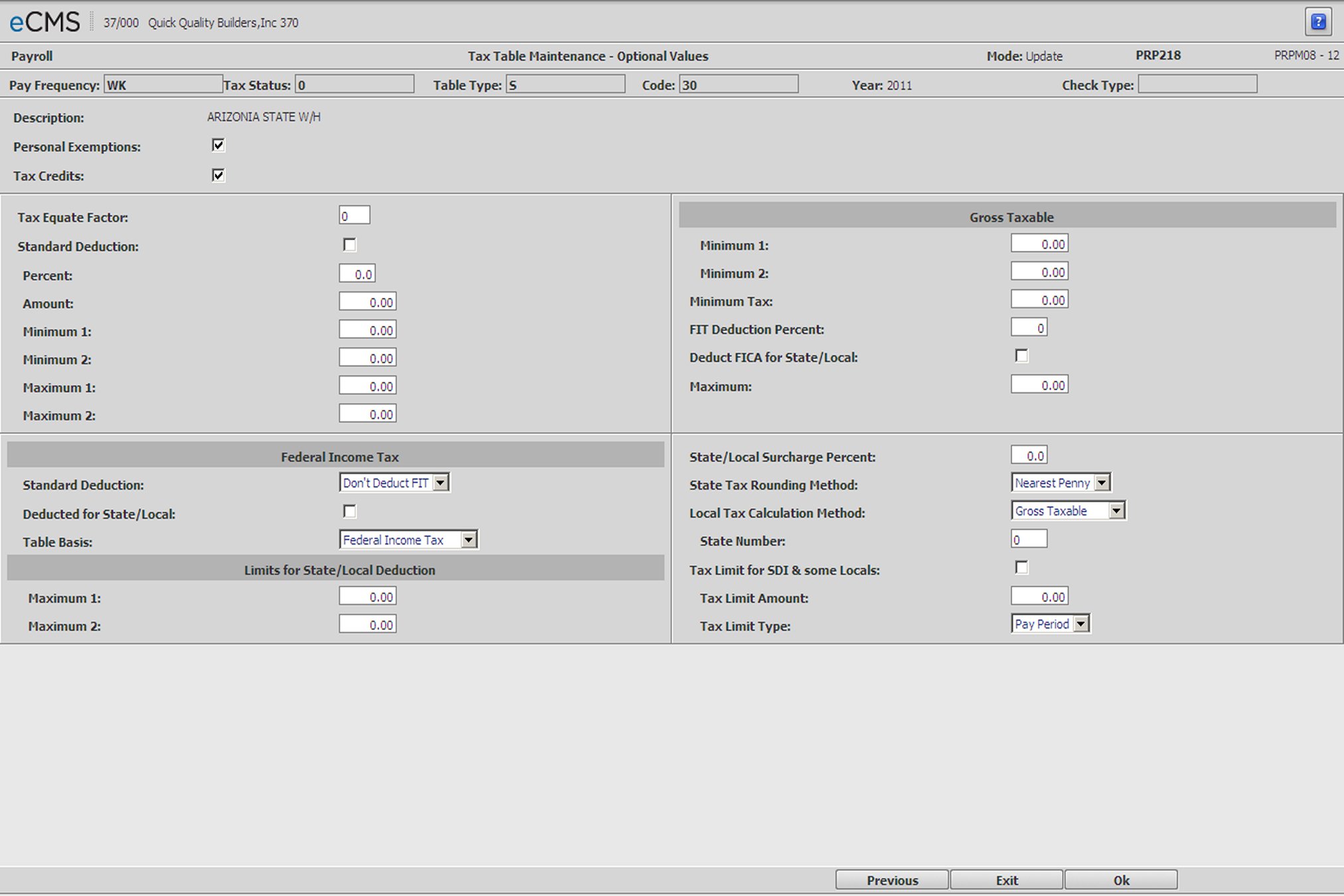
Employee Tax Table - Optional Values
Employee Tax Table Detail - Optional Values screen
Sample Tax Table from Circular E
Tables For Percentage Method Of Withholding
TABLE 1--IF THE PAYROLL PERIOD WITH RESPECT
TO AN EMPLOYEE IS WEEKLY
(b) MARRIED person
Not over $50............0
over- but not over-- of excess over
$50 --$199........ …..12% --$50
$199 --$398... …......$17.88 plus 17% --$199
$398 --$490....... …..$51.77 plus 22% --$398
$490 --$600.... ….....$71.95 plus 25% --$490
$600 --$710..... …....$99.45 plus 28% --$600
$710 --$930.. ….......$130.25 plus 33% --$710
$930.............. ………$202.85 plus 37% --$930
Income Tax Calculation
The following example illustrates how the eCMS Payroll system performs the calculations for the Standard Tax Tables. This example is the table for Percentage Method of Withholding found in the Federal Income Tax Circular E.
Consider the example of a base salary of $500.00 paid weekly to an individual who is married, claiming two dependents.
500.00 Base salary
38.46 Exemptions (19.23 X 2)
461.54
50.00 0 bracket amount
411.54
- 149.00 (199. - 50.) * 12% = 17.88
262.54
- 199.00 (398. - 199.) * X 17% = 33.83
63.54 Remainder * 22% = 13.98
Federal Income Tax Amount = 65.69
Compare this amount with the amount found in the Tax Tables of Circular E. The percentage method is a more exact method of calculating the tax liability.
Tax Equate Factor
This field allows an annual tax table setup to be adjusted to withhold at a weekly, biweekly, semi monthly, or monthly rate.
For example, if your pay periods are weekly, enter 52 to adjust an annual table to weekly, if the pay period is semi-monthly, enter 24.
Standard Deduction
Select this option to use a Standard Deduction to calculate taxable income.
Percent/Amount
Enter the percentage and/or amount of the standard deduction to be subtracted from gross taxable income in determining the amount subject to tax. If an additional amount is to be deducted over the percentage, enter the amount. For a fixed amount, key a 0 percentage and the dollar amount.
Minimums
Enter the minimum standard deduction amount to be used. If the amount calculated by the Standard Deduction Percentage is less than the minimum amount(s), the minimum amount is used in the calculation.
Maximums
Enter the maximum standard deduction that is allowed. If the amount calculated using the standard deduction percentage is greater than the maximum amount(s), the maximum amount is used in the tax calculation.
Federal Income Tax
Standard Deduction
Click the prompt and select whether or not to deduct Federal Income Tax before the Standard Deduction is calculated.
Deducted For State/Local
Select this option to deduct FIT from taxable income before the calculation of state or local taxes.
If this option is not selected, Federal income tax will not be deducted from taxable income before the state or local tax is calculated.
Table Basis
Click the prompt and select a base upon which the Federal Income Tax will be calculated. The options include:
Gross Taxable
Federal Income Tax
Federal Tax Deduction
Limits for State/Local Deduction
Maximum 1/Maximum 2
Enter the maximum amount of Federal Income Tax that can be deducted prior to calculating State or Local Taxes.
Gross Taxable
Minimum
Enter a minimum amount of gross earnings below which taxes will not be calculated. If this minimum is not met, no tax will be calculated.
Minimum Tax
Enter the minimum tax amount to be paid. If the tax calculated is less than the minimum, the minimum tax is used.
FIT Deduction Percent
Enter the percentage deductible if all (100%) of the FIT Deduction is not used for calculating State or Local Taxes.
Deduct FICA for State/Local
Select this option to have FICA deducted before a State or Local Tax is calculated.
Maximum
If FICA is deductible, enter the maximum amount of FICA that can be deducted. Leave this field blank if there is no limit.
State/Local Surcharge Percent
The surcharge percentage is added to the tax after it has been calculated. Enter a percentage if this state or local taxing authority has such a factor.
State Tax Rounding Method
From the drop-down list, select either Nearest Penny or Nearest Dollar as the rounding method.
The rounding method currently affects only the state tax calculation. Federal and local tax calculations are not affected by this prompt.
Note: South Carolina requires rounding to the nearest dollar.
Local Tax Calculation Method
Gross Taxable |
The Gross Taxable wages will be the base upon which tax will be calculated. |
State Income Tax |
The tax withheld by the State indicated in the State Withholding Code field, will be the base upon which tax will be calculated. |
State Number
Enter a state code when the Pct prompt equals 1.
Tax Limit for SDI & some Locals
Select this option to specify an SDI amount, or limit. Entries will be required in the Tax Limit Amount and Tax Limit Type fields.
Leave this option cleared if there is no specific tax limit corresponding to the wage limit.
Tax Limit Amount
Enter the maximum amount of SDI/Local that can be deducted from an employee's gross earnings during the period specified in the Tax Limit Type field (see below).
Tax Limit Type
Click the prompt and select one of the following options from the list.
Pay Period |
The SDI/Local Limit is per Pay Period. Hawaii, e.g. |
Annual |
The SDI/Local Limit is Yearly. California, e.g. |
Quarterly |
The SDI/Local Limit is Quarterly. |
Monthly |
The SDI/Local Limit is Monthly |
Settings for the Denver Occupational Tax should be as follows:
Gross Taxable Minimum needs to be set at the monthly limit when taxes are calculated, which is $600.00.
Select the Tax Limit for SDI & some Locals option.
Set the Tax Limit Amount field to the monthly tax limit of $5.75.
Set the Tax Limit Type field to Monthly.
Refer to current government requirements for the exact gross taxable and tax limits.
 |
Click to process these entries and return to the Employee Tax Table Selection screen. Enter additional information to maintain another tax table or exit to the menu. |
 |
Click to return to the Main Menu without saving changes. |
 |
Click to return to the Employee Tax Table Detail - Tax Credits screen without saving changes. |